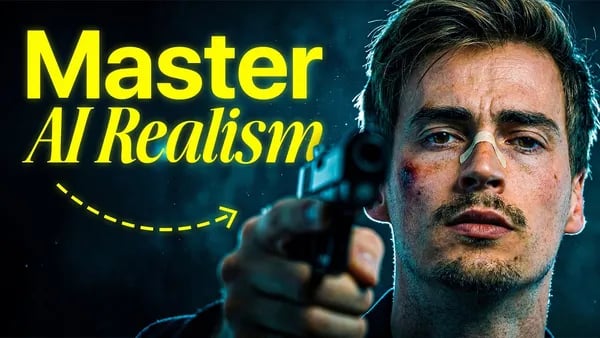

Creating AI videos that look ultra realistic requires more than just advanced algorithms—it demands a deep understanding of cinematic principles. My approach with Higgsfield AI centers on mastering image quality first, dedicating nearly all the effort to perfecting stunning, cinematic images. These images serve as the essential building blocks for truly immersive videos that blur the line between AI-generated and real life.
In this blog, you'll learn the foundational techniques behind cinematic imagery, including crucial aspects like lighting, composition, and color. I’ll introduce you to powerful tools like Nano Banana Pro, Nano Banana 2, and Hicksfield Soul, which form the core of my workflow. Through this detailed guide, you’ll discover how focusing intensely on image excellence transforms the final AI video, resulting in creations that feel incredibly lifelike and emotionally engaging.
Did You Know?
Most AI videos start with 99% focus on image quality before moving to video, a secret to ultra-realistic results.
Source: Higgsfield AI
The Foundation: Starting with Cinematic Images
Creating ultra realistic AI videos begins long before the moving frames. The cornerstone of truly cinematic AI video lies in the quality and craftsmanship of the images you generate first. In my experience at Higgsfield AI, focusing predominantly on image creation rather than rushing to video production makes all the difference. Approximately 99% of my time is dedicated to perfecting these cinematic images, which serve as the essential building blocks for the final video output.
One common mistake many creators make is underestimating the power of a well-composed image. They often dive directly into video generation without developing a strong visual foundation. However, mastering lighting, composition, depth, and color in images is critical. For example, flat lighting can make visuals appear dull and lifeless, while strategic lighting that adds contrast and depth creates mood and realism. Composition techniques like the rule of thirds help position key elements, guiding the viewer's eye naturally across the frame.
Depth is another vital component. Establishing layers within an image—foreground, midground, and background—gives a three-dimensional feel that translates beautifully to video. Alongside this, color choices play a powerful role in evoking specific emotions and setting the cinematic tone. The right palette enhances the storytelling effect and helps the video resonate with viewers on a deeper level.
To achieve these visual goals, I rely on specialized tools such as Nano Banana Pro, Nano Banana 2, and Hicksfield Soul. Hicksfield Soul, in particular, offers a cinematic look with superior detail and natural flow, essential for laying down the groundwork. These tools, combined with Cinema Studio for shot crafting, give creative control and precision in shaping the final imagery that will evolve into ultra realistic videos.
Why My AI Videos look Ultra Realistic - Higgsfield AI is rooted in this foundational approach: investing in the cinematic image first before moving on to motion. This workflow ensures each video frame carries the richness, depth, and authenticity necessary for indistinguishable realism.
Focus Primarily on Images
Dedicate most of your creation time to perfecting cinematic images—they are the base of your video.
Utilize Specialized Tools
Use tools like Nano Banana Pro, Nano Banana 2, and Hicksfield Soul for superior cinematic image generation.
Master Lighting and Composition
Avoid flat lighting; aim for contrast, depth, and apply the rule of thirds to enhance visual storytelling.
Create Depth in Your Shots
Incorporate foreground, midground, and background elements to add realism and cinematic feel.
Harness Emotional Color Use
Use color intentionally to evoke emotions and strengthen the cinematic atmosphere.
Key Components of Cinematic Imagery
Creating videos with ultra-realistic quality begins with mastering the fundamental building blocks of cinematic imagery. These core elements—lighting, composition, depth, and emotion—determine whether an AI-generated image feels flat and artificial or vibrant and lifelike.
Lighting is arguably the most critical factor for cinematic realism. Unlike flat, even lighting that offers little dimensionality, dynamic lighting introduces shadows and highlights that bring depth and texture to a scene. Tools like Hicksfield Soul excel in generating naturalistic lighting contrasts, mimicking the interplay of light sources in real-world environments. Directional light with varied intensity creates visual interest and guides the viewer’s eye toward key elements, making the image visually compelling.
Composition organizes the contents of the frame so the viewer’s attention is drawn intuitively to the most important features. The rule of thirds remains a foundational guideline, dividing the image into a grid and placing focal points near intersecting lines to achieve balance and harmony. Using Nano Banana Pro, creators can experiment quickly with compositional frameworks, ensuring scenes feel well-structured rather than cluttered or random.
Depth is what transforms a flat image into a three-dimensional experience. Introducing distinct foreground, midground, and background layers creates spatial relationships that trick the brain into perceiving volume and distance. Effective use of depth cues—such as overlapping elements, atmospheric perspective, and scale differences—is supported by the integrated environments and scene setups found in Cinema Studio, part of the Hicksfield tools ecosystem. This layering is essential to cinematic storytelling because it provides context and helps convey a sense of place.
Perhaps less obvious but no less powerful is the component of emotion. Color palettes and tonal choices influence the mood of an image, evoking specific feelings from the audience. Warm tones can convey comfort or passion, while cooler tones might evoke melancholy or tension. Emotionally charged images become memorable and impactful. Hicksfield Soul’s advanced color grading capabilities enable creators to fine-tune the emotional resonance of every frame.
Each of these factors plays a synergistic role in crafting cinematic images that do not merely replicate reality but elevate it. By investing nearly all the creative effort in perfecting these images first, then compiling them into videos, Higgsfield AI achieves an unparalleled level of ultrarealism in AI-generated video content.
Key Components of Cinematic Imagery
Mastering lighting, composition, depth, and emotion is essential to creating ultra-realistic cinematic AI images. These elements form the foundation for stunning AI-generated videos.
- ✓ Dynamic Lighting: Contrast and depth over flat light
- ✓ Balanced Composition: Rule of thirds for framing
- ✓ Spatial Depth: Foreground, midground, background layers
- ✓ Emotional Impact: Color and mood that resonate
Tools of the Trade: Nano Banana and Hicksfield Soul
The foundation of ultra-realistic AI video creation begins with mastering high-quality image generation. Central to this process are the tools Nano Banana Pro, Nano Banana 2, and Hicksfield Soul. Each provides unique strengths that contribute to a seamless cinematic workflow.
Nano Banana Pro serves as the initial tool for producing sharp, detailed images. Released in 2022, it excels at generating high-resolution visuals with clear textures, making it ideal for professional creators and studios aiming to establish a solid visual base.
Building on that foundation, Nano Banana 2 was introduced in 2023 to enhance realism by adding depth and more nuanced visual elements. It supports advanced composition techniques, allowing creators to bring a more lifelike quality to their images prior to video production.
Finally, Hicksfield Soul, the newest tool released in 2024, focuses on elevating cinematic aesthetics through superior lighting and color grading. Designed to integrate flawlessly with Nano Banana products, it optimizes lighting contrast, composition, and emotional resonance in each frame.
These tools work in tandem alongside Cinema Studio, which aids in crafting cinematic shots by facilitating precise arrangement of elements according to compositional rules like the rule of thirds and layering. This integrated workflow ensures that every image not only looks realistic but also carries depth and mood essential for believable video sequences.
The importance of lighting and depth cannot be overstated when aiming for realism. Hicksfield Soul especially shines here, improving lighting quality to create contrast and enhance spatial relationships within the frame. This results in images with compelling foreground, midground, and background layers, which contribute significantly to the video's immersive feel.
By focusing on these cinematic images first, creators establish a strong visual narrative that translates seamlessly into videos. The images generated by Nano Banana Pro and Nano Banana 2 supply detailed, rich textures, while Hicksfield Soul adds the final polish of cinematic lighting and color harmony.
Once images are perfected, the next step involves assembling them into smooth video sequences. Consistency in style and mood across frames is crucial, and this is achieved through a combination of these specialized tools working together within the defined workflow.
Generate Cinematic Images
Use Nano Banana Pro and Nano Banana 2 to create high-quality base images that serve as the foundation for your videos.
Refine with Hicksfield Soul
Apply Hicksfield Soul model to enhance cinematic look with improved lighting, composition, and color depth.
Integrate into Cinema Studio
Utilize Cinema Studio for crafting cinematic shots by arranging elements according to composition rules.
Perfect Lighting and Depth
Focus on lighting contrast and spatial depth to add realism and emotional impact to your images.
Assemble Video Sequence
Combine perfected images into smooth, cinematic video sequences with consistent style and mood.
| Feature | Nano Banana Pro | Nano Banana 2 | Hicksfield Soul |
|---|---|---|---|
| Release Year | 2022 | 2023 | 2024 |
| Primary Use | High-resolution image generation | Enhanced cinematic image generation | Cinematic lighting and composition enhancement |
| Key Strength | Sharp detail and texture | Improved realism with depth | Superior lighting and color grading |
| Integration | Compatible with Cinema Studio | Supports advanced composition techniques | Seamless workflow integration with Nano Banana |
| User Focus | Professional creators and studios | Advanced users focusing on realism | Artists seeking cinematic aesthetics |
Comparison: AI Video Quality vs. Real Life
The quest to create AI-generated videos indistinguishable from real-life footage hinges on understanding where AI currently excels and where it still lags behind. Higgsfield AI's workflow addresses these nuances by placing heavy emphasis on the foundation of cinematic-quality images before assembling them into video form. This approach is pivotal because real-life videos benefit from natural and complex lighting, texture, and motion dynamics that are challenging to replicate with AI alone.
One of the key distinguishing factors lies in resolution and frame rate. While modern AI video tools, including those within the Hicksfield and Nano Banana suites, can produce resolutions up to 4K, a limitation often emerges in frame rates. Real-life video typically runs smoothly at 30 frames per second or higher to ensure natural motion fluidity. AI videos consistently reach around this frame rate but can struggle to maintain it under complex scenes due to the computational demand.
Color depth and texture realism form another crucial point of comparison. In real-world footage, color captures a vast dynamic range influenced by natural lighting and materials, often quantifiable at 10 bits or higher per channel. AI-generated outputs approximate this depth effectively; however, subtle variations such as surface texture, slight glossiness, and material irregularities tend to be less nuanced. This can create a detectible gap when viewers closely inspect AI videos.
Lighting accuracy is one of the defining qualities that separate real-life footage from AI renders. While AI tools like Hicksfield Soul specialize in cinematic lighting that adds depth and contrast, achieving flawless simulation of multiple light sources, shadows, and reflections remains complex. Real-life videos inherently benefit from organic light interactions that current AI models approximate but do not perfectly reproduce, resulting in some flatness under certain conditions.
User perception further clarifies these technical distinctions. In controlled comparisons, viewers often report that AI-generated videos are visually impressive but still subtly artificial. The subconscious cues triggering this include slightly unnatural lighting gradients, missing atmospheric effects, and mechanical motion interpolation. However, with Higgsfield AI's workflow that prioritizes image quality, composition, and layered depth—using foreground, midground, and background elements—this perceptual gap narrows significantly.
Higgsfield’s multi-tool approach, involving the Nano Banana Pro for detailed image refinement, Hicksfield Soul for cinematic mood, and Cinema Studio for video assembly, leverages strengths at each stage. By investing nearly all initial effort into image perfection rather than rushing into video generation, the resulting AI videos contain inherent realism that surpasses many standard AI video pipelines.
Overall, while AI videos currently rival many aspects of real-life footage in resolution and manage commendable lighting effects via advanced models, they still face challenges in replicating the full complexity of motion, intricate textures, and lighting variations present in natural scenes. Continuous tool development, combined with rigorous workflows like Higgsfield AI’s, is progressively closing this gap, making ultra-realistic AI videos increasingly feasible both visually and perceptually.
Tips for Mastering AI Video Creation
Creating ultra-realistic AI videos starts with strong foundational images. Prioritize image creation over rushing into video generation. Tools like Nano Banana Pro, Nano Banana 2, and Hicksfield Soul are key for producing cinematic visuals that serve as the core building blocks of your videos.
Pay close attention to lighting by introducing contrast and depth instead of relying on flat lighting, which flattens the image. Composition techniques such as the rule of thirds help you arrange elements harmoniously within the frame.
Incorporate layered depth by using foreground, midground, and background elements to enhance realism. Color plays an emotional role, so thoughtfully select palettes to evoke the desired mood.
Common pitfalls include focusing too much time on video generation while neglecting image quality, using uninteresting lighting setups, and failing to build spatial depth with multiple layers. Avoid these to elevate your results.
For resources, Hicksfield's Cinema Studio aids in crafting cinematic shots, and exploring their linked tools in the video description can expand your practical skill set for AI video creation.
Best Practices for AI Video Creation
Focus on creating cinematic images before generating videos, use lighting, composition, and color to add depth and emotion.
- • Use Nano Banana Pro, Nano Banana 2, and Hicksfield Soul for realistic imagery
- • Apply the rule of thirds for balanced composition
- • Create lighting with contrast and depth, avoid flat lighting
Common Pitfalls to Avoid
Avoid rushing video generation without strong images, neglecting lighting and composition, and ignoring emotional color use.
- • Spending too much time on video instead of images
- • Using flat, uninteresting lighting setups
- • Overlooking foreground, midground, and background layers for depth
Frequently Asked Questions
Creating ultra-realistic AI videos hinges on starting with the right tools. Nano Banana Pro, Nano Banana 2, and Higgsfield Soul are essential, focusing mainly on high-quality image generation. These images form the foundation of cinematic videos. Cinema Studio is also an important tool that helps in crafting cinematic shots effectively.
Ensuring quality involves perfecting images before video production. Attention to lighting, composition, and depth is crucial. Using cinematic lighting to create contrast and depth, applying the rule of thirds for balanced composition, and layering foreground, midground, and background elements enhance realism. Color grading further amplifies emotional impact within the frames.
As for AI replacing real footage, while AI-generated visuals are impressively realistic, subtle imperfections are still detectable. Many video creators employing Higgsfield AI integrate AI content with actual footage to sustain authenticity in their projects. Though advances continue, full replacement of real footage demands considerable expertise across various creative disciplines.
What tools do I need to create ultra-realistic AI videos? ▼
How do I ensure the quality of my AI videos? ▼
Can AI completely replace real footage for videos? ▼
Conclusion
Achieving ultra-realistic AI videos with Higgsfield AI starts with mastering cinematic image creation. This foundational step ensures that the final video transcends the typical AI-generated look, making it indistinguishable from real footage. Central to this process are the tools Nano Banana Pro, Nano Banana 2, and Higgsfield Soul, which provide the cinematic quality crucial for impactful visuals.
Paying close attention to lighting, composition, depth, and color brings images—and subsequently videos—to life, enhancing their emotional and visual appeal. Rigorous focus on these elements transforms AI-generated content into immersive, believable cinema.
For creators aiming to elevate their video work, investing time in perfecting images before video production is essential. Exploring Higgsfield AI’s suite, including Cinema Studio, will empower you to implement these techniques seamlessly and produce cinematic AI videos with stunning realism.
🎯 Key Takeaways: Why My AI Videos look Ultra Realistic - Higgsfield AI
- → Master cinematic image creation as the foundation for ultra-realistic AI videos.
- → Use key tools like Nano Banana Pro, Nano Banana 2, and Higgsfield Soul for best results.
- → Focus on lighting, composition, depth, and color to achieve cinematic quality.
